

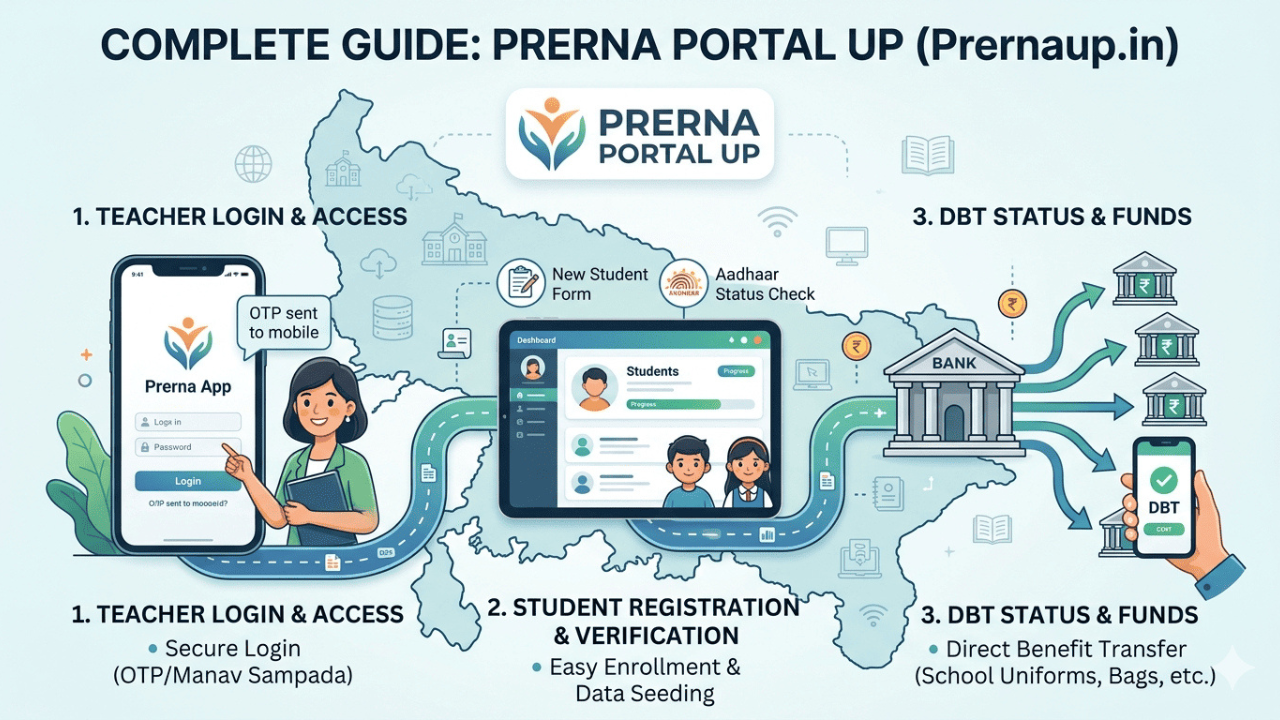
Prerna portal is an online education platform of Department of Basic Education, UP Govind Ballabh Pant Government of Uttar Pradesh. It supports Mission Prerna and provides helpful digital resources and services for students, teachers and schools. The platform consists of E-Pathshala, learning materials, teacher resources, Talent Hunt and various login options.
It is primarily created to facilitate improved learning and enhance the accessibility of learning resources online. This article provides you a detailed explanation about Mission Prerna, its facilities, student log ins, student registration, learning materials, teacher logins, talent hunt and much more in simple terms.
Who Is Mission Prerna?
Mission Prerna is an educational programme of the Government of Uttar Pradesh, in Basic Education Department. It primarily aims to enhance the quality of basic education and build children’s learning ability.
The project will be based on the core skills of reading, understanding and basic maths. Children need these skills to have a solid foundation for further study.
Digital learning resources are also used by Mission Prerna to assist teachers and students in their learning. It has separate areas for students and teachers and a number of education-related services.
Key Features of the Prerna Portal
The platform offers a variety of features for students, teachers and approved school users.
Student Learning Material
The Student’s Corner provides students with access to education materials. In this section, the official website comprises E-Pathshala, Learning Material, Posters and Charts and Talent Hunt.
The learning resources can assist students to study various topics and subjects. Some sections contain books, documents, videos and more digital content for users to access.
E-Pathshala
E-Pathshala is an online education platform for students. There is content and digital learning support available on the Mission Prerna website which is class-wise. Official information also refers to lesson plans and quizzes, e-books, among the resources available.
These materials can be used to complement students’ normal classroom learning.
Teacher Support
There are a number of helpful resources in the Teacher’s Corner. This involves teacher handbook, teaching-learning material, lesson plans, important documents, teacher awards, announcements and school-readiness resources.
A section that will assist teachers in accessing teaching resources and important information for the department from one location.
Talent Hunt
Talent Hunt gives students an opportunity to take part in creative activities. The district, school, class and the name of the student are provided in the official section. It also facilitates submission of images, documents and videos, depending on the selected activity.
Read Also: Thetechyx.com: Complete Guide, Features & What to Expect
How to Access Learning Material?
Students are usually able to follow these steps to locate the available learning resources:
- Go to the official website of Prerna UP.
- Open Student’s Corner.
- Click on E-Pathshala/Learning Material.
- Select the appropriate class or appropriate learning section.
- Choose the subject/topic.
- Open the Study material provided.
- Read or view the content.
Exactly which ones may change over the course of the site and section updates. Currently, the official website provides E-Pathshala, Learning Material and Posters and Charts as part of the Student’s Corner.
Prerna Portal Student Login
Authorized users can access their accounts using the login page. The current Official Login page has username, password and captcha. It also offers the option of Forgot Password.
Steps for Student Login
- Go to the official website of Prerna UP.
- Tap on the Login link.
- Enter your username.
- Enter your password.
- Type the captcha on the page.
- Verify the captcha.
- Click Proceed.
- View the services you have access to in your account.
Always log in through the official site and not through a third party website, and never reveal your password to anyone.
Student Registration
Student registration is primarily an administrative service of authorized school users. This source article provides a description of a process that uses student information and an Excel file.
The general process is:
- Visit the official website.
- Log-in with the necessary authentication.
- Click on student registration.
- If available, download the necessary file.
- Provide the student’s details properly.
- Save the document.
- Submit it via the appropriate portal.
Some of the steps may vary if the department modifies the website. Users are required to use their authorized account following the instructions shown within.
How to Edit Student Details?
Student information may also require correction and/or updating by authorized users. There is an option to edit student details that has been described in the source article.
There is a general process that includes:
- Please log in to the official website.
- Click on Edit Student Details.
- Select the class and the session you want to select.
- Choose the appropriate school details.
- Look up student record.
- Fill in the necessary information.
- Take the time to read the information through.
- Submit the changes.
Users are advised to verify all information prior to saving as incorrect information could impact school records.
Bank Data Upload
In addition, there is a Bank Data Upload section on the official website. It has a Teacher Login option, a user manual and a separate manual for DBT verification.
This service is designed to be used by those authorised to access such school or pupil information. Before uploading data users should read the instructions that are available and be sure they are authorized to upload it.
Mission Prerna Mobile Application
There’s also an Android Applications section on the official website. Digital application enables easier access for students and parents to learning content on their mobile device. The use of DIKSHA app/ digital content for students/ parents is also mentioned in the official Mission Prerna information.
Users must download Education Apps only from trusted and official sources. Do not download and install APKs from non-trusted third-party sites.
Talent Hunt Registration
Members of the students may join Talent Hunt on the appropriate platform of the official website. The current form asks for information such as the student’s name, father’s name, mobile number, district, school, class and activity topic. It also enables other forms of submissions, such as images, documents and videos.Students should fill in accurate information and adhere to the requirements on the website for submission.
Benefits of Mission Prerna
There are a number of advantages for students and teachers at Mission Prerna. Digital learning resources are available for students and handbooks, lesson plans and teaching-learning materials are available for teachers. The site also has creative activities with Talent Hunt.
The official website consolidates student services, teacher resources, and administrative aspects all in one place. This can help authorised users locate information and resources on the internet that relate to education.
Final Word
Mission Prerna also offers digital learning resources and education services to the students, teachers, and schools of UP. It has an online platform with sections such as Talent Hunt, E-Pathshala, learning resources, teacher resources, login services, and more. It is recommended to always refer to the official website for updated instructions for registration, login and submission of the form, as features and procedures can be updated over time.
FAQs
1.What is Prerna portal?
Prerna is an online portal of the Department of Basic Education, Government of Uttar Pradesh for education.
2.Who is the founder of Mission Prerna?
Mission Prerna is an initiative of the Government of Uttar Pradesh through the Department of Basic Education.
3.How can students access learning material?
Go to the official website of Prerna UP and click on Student’s corner. Click on E-Pathshala or Learning Material and then on the class or subject page, select the content that is available.
4.How can I log in to Prerna UP?
Go to the official website, type in your username and password and captcha and hit Proceed. If you don’t remember your password, click on the recovery link displayed on the login page.
5.What is Talent Hunt?
Talent Hunt is a kid’s creative activity part where kids can take part in creative activities. You can submit it at the official page, and there is also an option on the page to view the list of winners month-wise.
Read More: What is IOCMKT Full Form: Introduction, Quality and Reliability
